12 September 2026 · 7 min read
Migrating from Dynamics GP to Business Central
Most GP-to-BC migrations fail end users, not the technical team. An honest guide for Gulf operators on what changes, what breaks, and where to spend migration budget.
Key takeaways
- Data quality — not technical complexity — is the single biggest migration blocker: GP environments routinely carry duplicate vendors, orphaned records, and years of unreconciled entries that transfer intact unless audited first.
- Business Central's navigation model is structurally different from GP's menu-driven UI; operators who expect a 'reskinned GP' lose 3–6 weeks of productivity before adjusting.
- Five decisions must be locked before go-live: chart of accounts redesign, open transaction strategy, customisation replacement plan, integration re-mapping, and user-acceptance test scope.
- Gulf businesses should direct migration budget toward process documentation and role-specific training first — not licensing upgrades — because untrained operators create more rework than legacy software ever did.
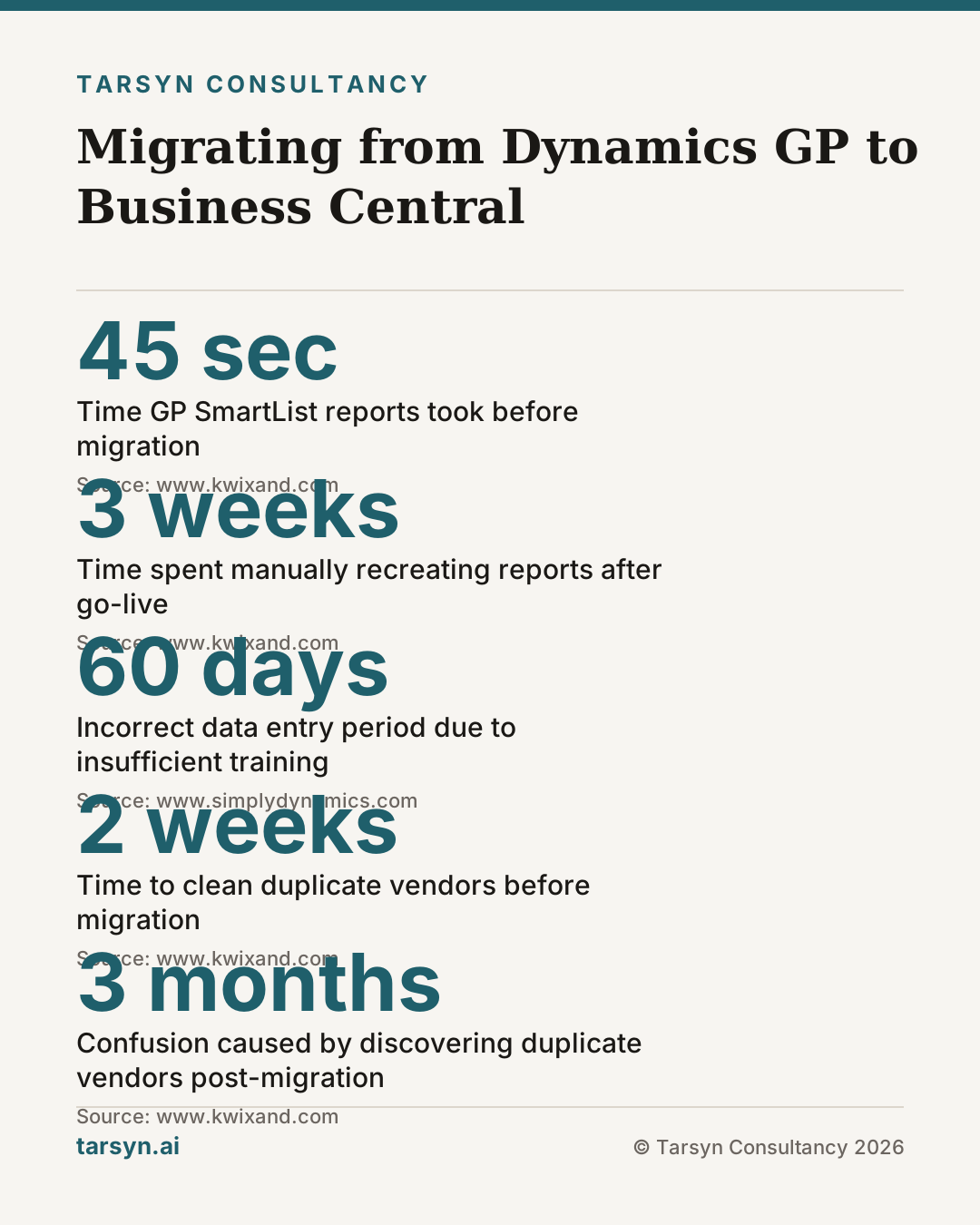
A finance controller at a trading company in Sharjah told us she spent the first three weeks after go-live manually recreating reports she had run in Dynamics GP in forty-five seconds. Business Central was live. The data was there. But nobody had mapped her GP SmartLists to the new query structure, and her approval chain — wired through a WhatsApp group and three Excel files — had no formal home in the new system. The migration had succeeded technically. The business had stalled operationally.
This is the pattern. And it is more common than any implementation partner wants to admit.
Why GP-to-BC Is a Bigger Shift Than Most Teams Realise
Microsoft Dynamics GP was built as a standalone financial management system. Business Central is a cloud-native ERP platform — different architecture, different data model, different navigation logic, and a fundamentally different philosophy about how workflows connect. Moving from one to the other is not an upgrade. It is a replacement.
The surface similarity fools people. Both carry the Microsoft badge. Both handle AP, AR, GL, and inventory. Project sponsors who signed the migration budget often reassure their teams: "It's basically the same system, just in the cloud." It is not [1].
GP's menu-driven navigation — where users knew the exact path to every screen — disappears. Business Central uses a search-first, role-centre model. Power users who navigated GP by muscle memory spend weeks recalibrating. Meanwhile, the customisations your team relied on — Dexterity modifications, SQL-based triggers, third-party add-ons — do not migrate. They must be individually assessed, rebuilt as BC extensions, replaced with native features, or retired entirely [2].
The technical team handles this transition reasonably well, because it is their job to handle it. The finance clerk who has run the same month-end routine since 2017 handles it far less well, and nobody budgeted for her learning curve.
What Actually Changes for Day-to-Day Users
The honest list of what shifts for operators on day one:
- Navigation. The GP menu tree is gone. Business Central uses role centres — personalised landing pages — and a universal search bar. Users who cannot find a screen stop using the system and find workarounds.
- Report generation. GP's SmartLists gave non-technical users flexible ad hoc queries. BC replaces this with financial reports, account schedules, and Power BI integration. The capability is greater, but the path to get there is different [3]. If nobody maps the twenty most-used SmartLists to BC equivalents before go-live, you will hear about it on day two.
- Approval workflows. GP approvals were often informal — a phone call, a WhatsApp message, a manager's initialled printout. BC has structured workflow approvals built in. If those approval chains are not configured before go-live, either the workflow breaks or users bypass it [1].
- Posting logic. GP allowed more flexibility in backdating and editing posted transactions. BC is stricter. Finance teams accustomed to adjusting posted entries directly will find BC's audit trail logic frustrating until they understand the correction mechanisms available.
- Data entry patterns. GP batch entry and BC's document-centric entry model differ. Users who process high transaction volumes — payables clerks, inventory receivers — need explicit training on the BC equivalent of every routine they currently perform [2].
None of these changes are inherently bad. Several are improvements. But each one is a point where an untrained operator will stall, improvise, or — most dangerously — enter data incorrectly and move on.
The Five Things to Settle Before You Cut Over
These are not technical decisions. They are business decisions that the technical team cannot make for you.
1. Chart of accounts redesign. GP migrations are the right moment to restructure your COA — not carry it across verbatim. Most GP environments have accounts added opportunistically over years, with inconsistent dimension logic and naming. Moving that structure into BC unchanged means inheriting every shortcut your predecessors took. Decide which accounts are consolidated, which are split, and how dimensions replace segments, before a single record is imported [3].
2. Open transaction strategy. Do you migrate open invoices, open POs, and open sales orders? Or do you cut over with a clean opening balance and re-enter actives manually? There is no universally correct answer — it depends on transaction volume and the quality of your GP data. But you must decide, and the decision must come from finance leadership, not the implementation partner [1].
3. Customisation replacement plan. List every GP customisation your teams use. For each one: can BC do this natively? If not, is there a BC app? If not, does it need to be rebuilt? If the customisation exists because of a workaround for a process that no longer makes sense, retire it. This audit is tedious and must happen before go-live, not after [2].
4. Integration re-mapping. GP connected to your warehouse system, your bank, your payroll, your ecommerce platform, or some combination of spreadsheets acting as middleware. BC connects differently. Inventory integrations, in particular, need careful re-mapping — our piece on WMS integration with Business Central covers the practical failure points in detail. Map every data flow on paper before assuming the connector will handle it.
5. User-acceptance test scope. UAT is not "does the system work." UAT is "can a real user, in their real role, complete their real tasks without assistance." Define specific scenarios for each department. Run them with the people who will actually use the system — not the project manager standing in for them [1].
Miss any of these five and you will be solving it after go-live, under pressure, with live business data at risk.
Training Approaches That Work for Non-Technical Teams
Generic vendor training — a two-day classroom session with a slide deck built for a generic audience — is close to useless for operators who need to run month-end in six weeks. We have seen this pattern repeatedly.
What works:
Role-based, scenario-driven walkthroughs. Build a fifteen-minute walkthrough for the payables clerk that covers exactly what she does: invoice entry, three-way match, payment run. Do the same for the inventory coordinator, the sales order processor, the finance manager. Use your own company's data — not demo data — so the screens look familiar from day one.
Super-users, not just trainers. Identify one capable person in each department who goes through extended pre-go-live training and becomes the internal escalation point. This person answers "where is that screen now?" questions immediately, without a support ticket. For Gulf operations where teams are multi-lingual, the super-user also bridges language gaps that vendor training glosses over.
Arabic-language process documentation. If your AP team works primarily in Arabic, your BC walkthroughs should too. This is not optional for Gulf operations. Operators who cannot read their reference material do not use it.
Short feedback loops post-go-live. Schedule a thirty-minute daily stand-up for the first two weeks. Collect the same five broken-workflow complaints before they become habit. Fix them fast. The first two weeks set the patterns for the next two years.
One principle connects all of this: a dashboard is not a decision. Business Central gives you better visibility than GP ever did — but only if your operators trust the data going in. Training is how you earn that trust.
Tarsyn's View: Where Gulf Operators Should Spend Migration Budget
Here is the honest version of the budget conversation.
Most Gulf businesses we speak with allocate the majority of their migration budget to licensing, infrastructure, and the implementation partner's fees. These are necessary costs. They are also the costs the partner is most motivated to help you understand, because they are the ones the partner invoices.
The costs that get underweighted — and that determine whether the migration actually delivers — are process documentation, data remediation, and training.
Process documentation before migration means writing down, in plain language, exactly how your business runs today: who approves what, what triggers a PO, how a disputed invoice gets resolved, what happens when a delivery arrives short. This work feels like overhead. It is actually the foundation that makes BC configuration decisions solvable rather than guesswork. If your processes are informal — and in most Gulf businesses, significant parts of operations run through WhatsApp, phone calls, and thirty-seven spreadsheets acting as a collective ERP — document them first, then configure BC around the formalised versions.
Data remediation is unglamorous and the most skipped step. Cleaning duplicate vendors before migration is two weeks of work. Discovering them after migration, when reconciliation differences are blamed on BC, is three months of confusion [1]. Spend the time before go-live.
Training has already been covered, but the budget point deserves repeating: under-training operators costs more than the training budget would have. A finance clerk entering data incorrectly for sixty days, because she was not shown the correct workflow, creates audit exposure and rework that dwarfs the cost of two extra days of role-based training.
On the question of AI features: BC's Copilot capabilities are real and expanding, and our piece on Dynamics 365 AI agents and their real-world limits sets honest expectations. But the right sequence is: clean data first, trained operators second, AI augmentation third. Operators who cannot navigate BC confidently will not benefit from AI suggestions layered on top of their confusion.
Before your migration kicks off, we recommend a structured process and readiness review — the same kind of assessment we run through our /Audit engagement — to surface the data quality issues, customisation gaps, and workflow dependencies before they surface themselves at go-live. The questions are not comfortable. They are cheaper asked now than answered later.
The ERP implementation itself is six months. Living with its consequences is six years. The ratio of where you spend your attention should reflect that.
Frequently asked questions
How long does a Dynamics GP to Business Central migration typically take?+
For a mid-sized Gulf business, expect six to twelve months end-to-end when data cleanup, process redesign, and user training are included honestly in the project plan. Compressed timelines of three to four months exist but routinely skip data reconciliation and structured training — the two phases most likely to cause post-go-live pain. Timeline is driven by data quality, not system complexity.
What data problems should we fix before migrating from GP to BC?+
Prioritise vendor and customer deduplication, open purchase order reconciliation, and chart of accounts restructuring. GP environments accumulate years of workarounds — duplicate records, accounts used for multiple purposes, and items coded inconsistently. Migrating dirty data into Business Central does not clean it; it just makes the mess harder to find inside a new interface.
Do GP customisations migrate automatically to Business Central?+
No. GP customisations — Dexterity modifications, SQL triggers, and third-party add-ons — do not transfer to Business Central. Each must be individually assessed: rebuild as a BC extension, replace with a native BC feature, or retire it. Assuming customisations will 'come across' is one of the most common reasons migrations overrun their budget and timeline.
What ERP implementation training approach works best for non-technical Gulf teams?+
Role-based, scenario-driven training tied to your actual processes outperforms generic vendor training every time. Build short walkthroughs — under fifteen minutes — for each job function using your own data and Arabic-language materials where needed. Combine these with a designated super-user in each department who can answer live questions during the first month of operation.
Sources
- 1. Top Dynamics GP to Business Central Migration Challenges and How to Avoid Them — www.kwixand.com
- 2. GP to Business Central Migration Mistakes to Avoid | Simply Dynamics — www.simplydynamics.com
- 3. Migrating from Microsoft Dynamics GP to Dynamics 365 Business Central: A Complete Guide — prakashinfotech.com
Mohammed Z
Founder, Tarsyn
Mohammed builds the systems behind modern businesses — automation, AI decision layers, and the unglamorous plumbing that makes them work. He founded Tarsyn in Abu Dhabi.
Find out where your operation actually stands.
The AI Opportunity Audit maps your workflows, your data, and your decision bottlenecks — and tells you honestly whether AI is worth it yet.
Start the audit