26 August 2026 · 8 min read
WMS Integration with Business Central: What Actually Works
Most WMS-BC integration projects stall on one unanswered question: where does inventory truth live? A decision framework for Gulf warehouse operators, architecture-first.

Key takeaways
- Microsoft's own reference architecture assigns inventory quantity ownership to the external WMS and financial valuation ownership to Dynamics 365 — mixing these roles is the single most common cause of go-live failure.
- Data-residency decisions made after vendor selection add an average of one full design-phase rework cycle; architecture must precede the shortlist.
- Business Central's native warehouse module covers basic putaway and pick, but breaks down under real-time scanning, dynamic task assignment, and multi-location traceability — the three pressure points most Gulf 3PLs hit first.
- Periodic inventory reconciliation between WMS and BC is intentionally manual by design: neither Microsoft nor major WMS vendors recommend automating the balance process, because automated overwrites mask the root cause of discrepancies.
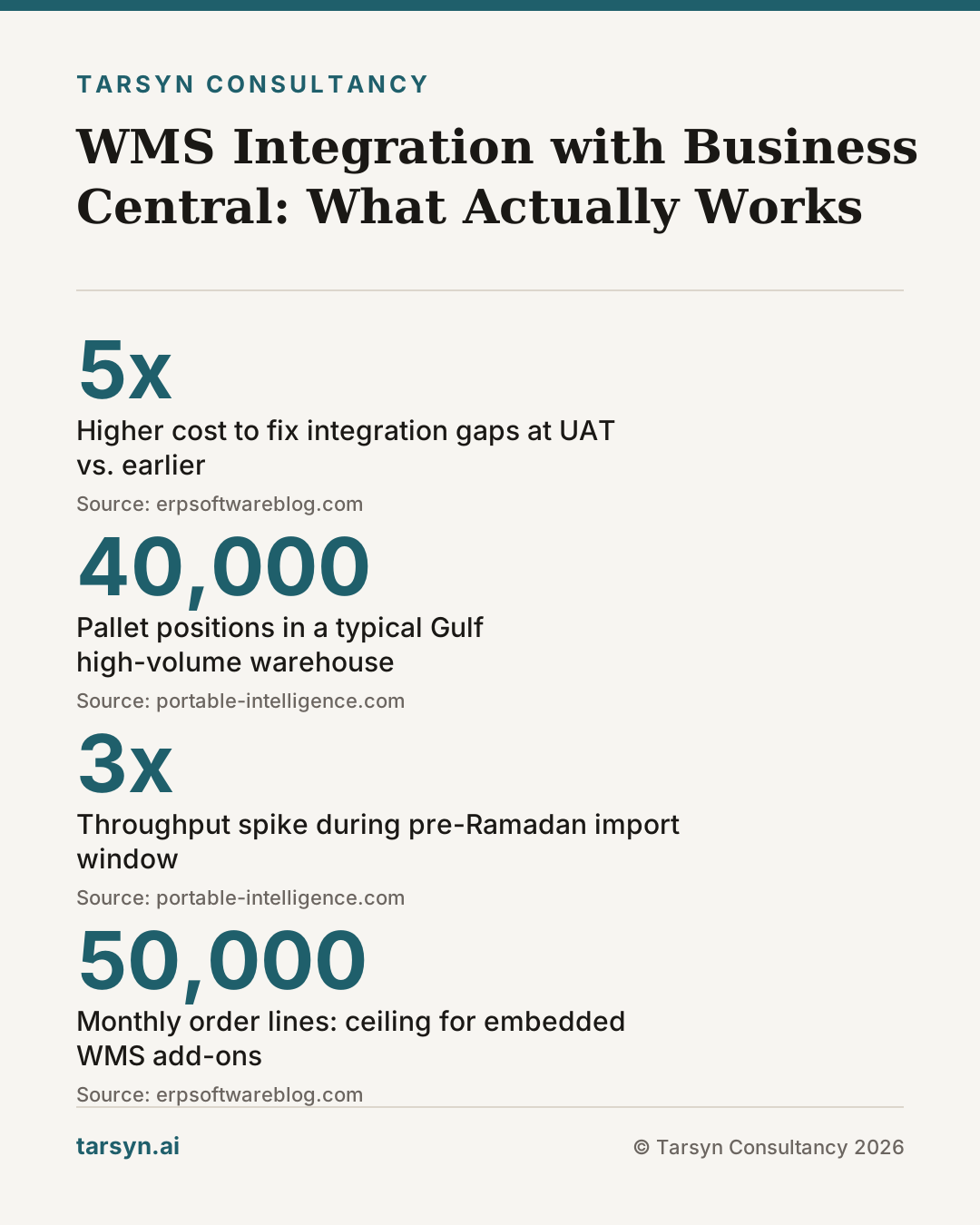
Picture a warehouse in Jebel Ali — 40,000 pallet positions, twelve inbound trailers queued at dock, a 3PL customer demanding real-time visibility, and a freshly installed Business Central that the CFO signed off on because the financial module is genuinely excellent. Now picture the project team, six months into go-live prep, realising that nobody has formally answered the question: when a picker scans a bin in the WMS, which system owns that inventory record?
That question is not a detail. It is the architecture. And in most WMS-BC integration projects, it gets answered by accident — usually by whichever vendor spoke last in the room.
Why WMS-ERP Integration Breaks Down Before Go-Live
The surface explanation for stalled integrations is always technical: API mismatches, middleware gaps, connector licensing. The real explanation is almost always organisational: IT, finance, and warehouse operations never formally aligned on who owns what data, and the gap surfaces at UAT when it costs five times more to fix.
Business Central is a capable ERP. Its native warehouse module covers basic putaway, pick, and ship for businesses running straightforward fulfilment. But as manufacturers and distributors grow, their warehouse operations routinely outpace what BC can handle on its own [2]. The pressure points arrive in a predictable order: first, paper-based or desktop-terminal picking that can't scale; then the absence of mobile scanning enforcement; then the inability to dynamically assign tasks on the floor; finally, multi-location traceability requirements that the regulatory environment in the UAE and KSA increasingly demands [2].
At that point, a dedicated WMS enters the conversation. And so does the question of systems integration — because you now have two systems that both believe they understand inventory.
The integration breaks down at go-live for one consistent reason: data-residency decisions were made too late, or not made at all. Teams spend months configuring connectors, then discover that their chosen architecture forces financial postings to wait on warehouse confirmations that arrive in batches — or that their WMS was configured to accept inventory adjustments from BC, creating a circular update loop that corrupts both records within days.
The Core Architectural Choice: Where Does Inventory Truth Live?
Microsoft's own reference architecture for balancing inventory between Dynamics 365 and an external WMS is explicit on this point: the external WMS is the system of record for inventory quantity, and Dynamics 365 is the system of record for transactional data and inventory valuation [1]. These are not recommendations — they reflect how the systems are actually designed to behave at load.
This separation is the right default for Gulf operators running high-volume warehouses, and here is why: inventory quantity changes constantly during a warehouse shift. Picks, putaways, transfers between zones, damaged-goods quarantine, cycle counts — every one of these is a WMS event. Routing each event through BC as it happens creates a volume and latency problem that even well-architected middleware struggles to absorb. The WMS needs to move fast. BC needs to be accurate.
The corollary is equally important: financial valuation cannot be a WMS function. The moment a WMS starts making cost-layer decisions — FIFO allocation, landed cost absorption, GCC VAT treatment on bonded stock — you have created an audit nightmare. Keep valuation in BC. Let the WMS count.
This sounds clean until you hit the reconciliation question.
Because inventory values get out of balance. Timing gaps between WMS updates and BC postings, failed integration messages, user errors on the warehouse floor — all of these create discrepancies in quantity and valuation [1]. The instinct is to automate the fix: write a job that detects discrepancies and overwrites the lagging system.
That instinct is wrong, and Microsoft and major WMS vendors like Manhattan say so explicitly [1]. Automating the balance process masks the root cause. A discrepancy is a signal — it means something in your process or your integration is broken. Overwriting it silences the signal. The recommended pattern is a periodic snapshot: pull inventory from both systems into a staging layer (Azure Data Lake and Synapse in Microsoft's reference architecture), compare them in a reporting tool, and investigate significant discrepancies with a human [1]. This is not a limitation of the technology. It is disciplined operations.
If your integration plan includes an automated inventory-levelling job, treat that as a red flag in your design review.
WMS Options That Integrate Well with Business Central — and the Trade-offs
There are two broad integration models, and each makes a different architectural bet [3].
Embedded or tightly coupled WMS add-ons live inside or directly beside BC, using BC's native data model and APIs. The appeal is obvious: one vendor, one support call, lower middleware complexity. The trade-off is ceiling — these solutions inherit BC's throughput constraints and are typically suited to mid-complexity operations. When scanning volume spikes (think Ramadan freight cutoffs or a flash-sale fulfilment surge), the shared compute environment can degrade both WMS responsiveness and financial posting speed simultaneously.
External WMS platforms (purpose-built warehouse execution systems) maintain their own database, their own transaction log, and their own task engine. They connect to BC via a defined integration layer — historically flat-file or EDI, increasingly API or middleware such as Azure Logic Apps or n8n. The trade-off here is integration overhead: you now own the seam [3]. That seam requires design, monitoring, and ongoing maintenance. But the ceiling is much higher, and the failure modes are isolated — a WMS outage does not take down BC financials, and a BC deployment does not freeze warehouse operations. For operations above a certain complexity threshold, this isolation is not a nice-to-have; it is an operational requirement.
The integration models worth evaluating for BC specifically include:
- Embedded WMS add-ons certified for BC — low integration overhead, best for sub-50,000-line/month operations, limited task orchestration
- Middleware-connected external WMS via Azure Logic Apps — Microsoft's reference stack, strong audit trail, higher infrastructure cost
- API-first external WMS with custom connector — maximum flexibility, requires integration engineering competency in-house or via a partner
- n8n or similar workflow automation layer as the integration middleware — lower cost than Azure Logic Apps for smaller throughput, but requires careful monitoring to catch silent failures (see Workflow Automation for ERP: What n8n Means for Gulf Ops)
None of these is universally correct. The right answer depends on your transaction volume, your latency tolerance for financial postings, and whether your data-residency obligations allow certain record types to live outside your country of operation.
Latency, Data Volume, and the Gulf Warehouse Reality
Gulf warehouse operations carry a few characteristics that European or North American reference architectures underweight.
Approval chains are longer. A purchase order in a mid-sized UAE distributor might require sign-off from three levels before goods receipt is confirmed in BC. During that approval window, the WMS has already moved the stock. The latency between physical movement and financial posting is not a technology problem — it is a governance reality. Your integration must tolerate that gap without creating phantom inventory positions.
WhatsApp is operational infrastructure. This is not a criticism; it is a fact. Warehouse supervisors in the Gulf routinely relay stock exceptions, dock instructions, and returns authorisations via WhatsApp before any system is updated. The WhatsApp-to-ERP gap is where discrepancies between WMS and BC often originate — a verbal instruction acted on in the warehouse, not reflected in either system for hours. Any integration architecture that does not account for this informal channel will produce reconciliation noise it cannot explain.
Ramadan and peak-season freight creates burst loads. Jebel Ali volumes spike sharply in the pre-Ramadan import window. A WMS-BC integration that performs adequately at average throughput can fail under a three-times spike if the middleware layer is not sized for burst. This is an infrastructure conversation that should happen in the design phase, not during hypercare.
Data-residency requirements are tightening. The UAE and KSA have both introduced or are developing data localisation requirements that affect where certain transactional records can be stored. For organisations running a cloud WMS with data centres outside the region, this is not a theoretical future problem — it is a current procurement decision. If your WMS stores bin-level transaction logs on European or US infrastructure, verify that this is compliant with your regulatory environment before you sign the contract.
Tarsyn's View: Architect the Seam Before You Pick the Vendor
We have seen this play out more than once: a Gulf operator shortlists three WMS vendors, runs demos, gets excited about the UI, signs a contract — and then calls us to figure out how to connect it to BC. At that point, the integration architecture is whatever the vendor proposes, because the contract is already signed and the implementation timeline is fixed.
That is backwards. The seam between your WMS and your ERP is not a connector you buy at the end. It is an architectural decision with consequences for data ownership, operational resilience, financial auditability, and regulatory compliance. It needs to be designed before the vendor demo, not after.
The specific questions that need written answers before you shortlist:
- Who owns inventory quantity — WMS, BC, or a shared staging layer? (The answer should almost always be WMS.)
- What is your acceptable latency for financial posting — real-time, hourly batch, or end-of-day? This determines whether you need a synchronous API integration or an async message queue.
- Where do transactional records live — and does that comply with UAE or KSA data-residency requirements?
- How will you reconcile discrepancies — manually with a periodic snapshot, or with an automated overwrite? (If the answer is automated overwrite, revisit that decision.)
- What is your burst capacity assumption — average throughput, or peak throughput? Size the middleware for the spike, not the baseline.
Once those five questions have written answers, the vendor shortlist becomes straightforward. Most of the demos start to sort themselves out because you can ask specific architectural questions instead of watching feature tours.
This is not exotic consulting work — it is the design session that should have happened in week two of the project. If you are already in implementation and these questions are still open, a rapid architecture audit is cheaper than a second go-live attempt.
A note on the ERP selection parallel: if you are still choosing between Business Central and other platforms entirely, the framing in How Manufacturers Should Choose an ERP Vendor applies directly — the WMS integration question belongs in that evaluation, not after it.
Multiply a capable WMS by a poorly architected integration and you get a very expensive source of inventory fiction. Get the architecture right first. The vendor choice is almost secondary.
Frequently asked questions
Can Business Central manage a high-volume warehouse without a separate WMS?+
Business Central handles foundational inventory well — purchasing, basic stock movements, financial posting. But it lacks real-time mobile scanning, dynamic task assignment, and multi-location traceability. For high-volume or complex operations (think 3PL or multi-zone picking), a dedicated WMS is the operationally honest answer, not a workaround inside BC.
What is the recommended system of record for inventory quantity in a WMS-BC integration?+
Microsoft's own reference architecture is explicit: the external WMS owns inventory quantity, and Dynamics 365 owns transactional data and financial valuation. Splitting these responsibilities correctly is the architectural decision that prevents most integration failures. Assigning both to one system — in either direction — creates reconciliation debt that compounds daily.
Should inventory reconciliation between WMS and Business Central be automated?+
No — and this is not a technical limitation. Both Microsoft and major WMS vendors like Manhattan actively recommend against automating the inventory balance process. Automated overwrites hide the root cause of discrepancies (failed integration messages, timing gaps, user errors). A periodic, human-reviewed snapshot comparison is the production-safe pattern.
What should Gulf operators decide before shortlisting WMS vendors for a BC integration?+
Three things: where inventory truth lives (WMS vs. BC), what latency is acceptable for financial posting (real-time vs. batch), and how data-residency requirements in the UAE or KSA affect where transactional records can be stored. Get those answers in writing before a vendor demo — otherwise the demo drives your architecture, and that is backwards.
Sources
- 1. Balance Inventory Between Dynamics 365 and External WMS - Dynamics 365 | Microsoft Learn — learn.microsoft.com
- 2. How a WMS Extends Business Central to Handle Complex Warehouse Operations - Portable Intelligence — portable-intelligence.com
- 3. External vs. Integrated WMS: Decoding the Best Fit for BC Users — erpsoftwareblog.com
Mohammed Z
Founder, Tarsyn
Mohammed builds the systems behind modern businesses — automation, AI decision layers, and the unglamorous plumbing that makes them work. He founded Tarsyn in Abu Dhabi.
Find out where your operation actually stands.
The AI Opportunity Audit maps your workflows, your data, and your decision bottlenecks — and tells you honestly whether AI is worth it yet.
Start the audit