30 July 2026 · 7 min read
When Automation Reports Success and Your Business Fails
Your automation logs show green, but records aren't moving. Here's why silent failures are worse than crashes—and how GCC operators can design workflows that fail loudly.
Key takeaways
- A green automation log can coexist with zero records being created — HTTP 400 responses are treated as successes by most platforms, hiding data loss for days or weeks.
- Four failure modes — phantom success, silent skip, ownership vacuum, and data drift — account for most automation breakdowns that no dashboard will catch.
- Approval chains and cross-system handoffs (Odoo to SAP, SAP to a bank portal) are the highest-risk points for silent failures in GCC operations.
- Designing for loud failure — explicit outcome assertions, dead-man's-switch alerts, and named workflow owners — prevents silent success from becoming a business problem.
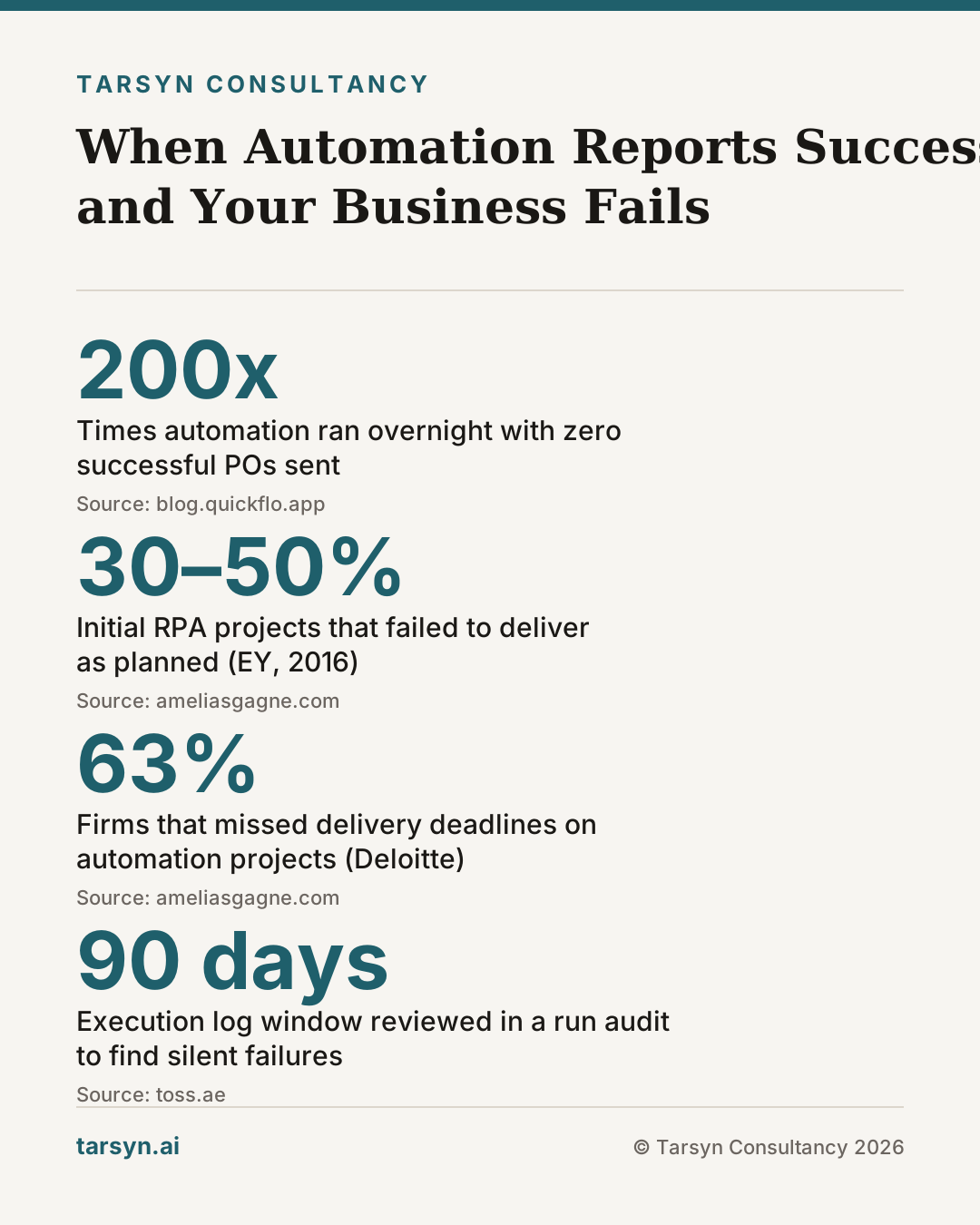
The automation ran 200 times overnight. The log is green. Your operations manager checks in before the morning standup and sees no alerts. The only problem: not a single purchase order reached the supplier. The trigger fired, the HTTP request got a response, and the platform moved on — oblivious to the fact that the response body said "duplicate vendor ID detected."
This is the failure mode that costs GCC operators the most, not because it's dramatic, but because it's invisible.
Why "green" is the most dangerous status in your automation log
Traditional workflow automation platforms model error as a binary: either a step throws an exception, or it succeeded. A network timeout? Exception. A code crash? Exception. The platform catches it, marks it failed, sends an alert.
But an HTTP request that returns a 400 Bad Request? From the platform's perspective, that step succeeded. It sent a request, got a response, and moved on. The fact that the response body says "invalid phone number format" or "record not found" is just data — data the platform does not read. [1]
Your dashboard is green. Your records are not being created. Nobody knows until someone notices a gap that is now two weeks wide.
This is not a niche edge case. Build a workflow that creates contacts in a CRM whenever a new lead comes in from a phone system. It runs 200 times a day. On day three, the CRM starts rejecting some records — a duplicate email field, a required field that changed. The automation platform sees a completed request every time. Downstream steps reference a "created" contact that was never actually created. The silent failure is now load-bearing. [1]
Automations that fail silently are worse than no automation at all. With no automation, you know the work is not being done. With a silently failing automation, you assume it is being done — so nobody checks. [1]
The four failure modes that look like success
Most workflow automation breakdowns fit into four patterns, none of which trigger a red alert:
-
Phantom success. The platform completes a step (an API call, a file write, a form submission) and records it as successful. The downstream system quietly rejected or ignored it. The automation has no outcome assertion — it only checks that the request was sent, not that the result landed. [1]
-
Silent skip. A conditional branch evaluates to "no match" and the workflow exits without processing the record. No error, no log entry beyond "completed." In practice, a filter misconfigured by one field means an entire category of records stops flowing. Nobody sets an alert for zero throughput.
-
Ownership vacuum. The automation covers the handoff between two systems but no human owns the end-to-end result. When a process breaks in the middle, each system owner assumes the other is responsible. A 2016 EY analysis found that 30 to 50 percent of initial RPA projects failed to deliver as planned — and a Deloitte global survey found 63 percent of firms missed delivery deadlines on automation projects, most often because complex, judgment-heavy processes were mistaken for simple, rules-based ones. [2] The ownership gap is almost always underneath those numbers.
-
Data drift. The automation was built against the data model as it existed at launch. Three months later, a required field was added to the ERP, a dropdown value was renamed, or a vendor ID format changed. The automation still runs. It still returns green. It is now producing malformed records that clear the intake check but fail downstream reconciliation — sometimes weeks later. [3]
Where ERP and workflow integrations break without telling anyone
Gulf operators running Odoo, SAP, or Microsoft Dynamics — often alongside a government e-invoicing portal, a local bank's payment API, and a WhatsApp-as-ERP layer for field teams — are structurally more exposed to silent failures than operators running a single integrated platform.
The reason is handoff count. Every point where data crosses a system boundary is a place where a record can stop without either system raising an exception. Odoo confirms a sales order was submitted. SAP's inbound queue never receives it. Neither platform flags the gap because each completed its own step correctly. The failure lives in the handoff nobody owns end-to-end.
Approval chains compound this. In a typical GCC procurement workflow, a purchase request might touch a department head's email, a finance approval in SAP, a treasury sign-off in a separate banking portal, and a final acknowledgment back into Odoo. Automate four of those five steps and the one manual step becomes the pinch point — except nobody configured an alert for the manual step timing out. The automation looks like it's running the whole process because four-fifths of it is green.
Failure rarely announces itself loudly in these environments. Instead, teams start building workarounds: side spreadsheets, manual re-entry, the finance person who "just checks Odoo every morning to make sure." Those workarounds are signals. [3] They show exactly where the automation has stopped matching reality, and they accumulate quietly until someone senior asks why the numbers don't reconcile.
For a detailed picture of where ERP automation breaks down in GCC-specific stacks, the ERP AI Readiness Audit for GCC Operators covers the structural gaps most implementation partners skip.
How to build automations that fail loudly by design
The fix is not a better monitoring dashboard. A dashboard reports; a decision layer acts. The fix is building automations that cannot silently succeed.
Four practical design rules:
1. Assert outcomes, not completions. After every write step, add an explicit verification: query the target system and confirm the record exists with the expected values. If the confirmation fails, the automation fails — loudly. This turns phantom success into a real error the platform will catch and alert on. [1]
2. Set throughput floors. Configure an alert that fires when a workflow processes zero records in a window where it normally processes dozens. This catches silent skips that no exception will surface. A dead-man's-switch pattern — "if this automation hasn't confirmed a successful outcome in four hours, page someone" — costs fifteen minutes to configure and catches the failures that look like silence.
3. Assign a named owner to every end-to-end flow, not each system. The SAP admin owns SAP. The Odoo admin owns Odoo. Nobody owns the handoff. Fix this structurally: one person or team is accountable for confirming that a record that enters the workflow exits correctly at the far end. That accountability should be documented, not assumed. [2]
4. Treat data model changes as breaking changes. Any schema update to an ERP — a new required field, a renamed lookup value, a changed vendor ID format — should trigger a mandatory review of every automation that touches that table. Most teams treat these as minor admin tasks. They are, in practice, the most common root cause of data drift failures. [3]
The broader principle: automation should be designed to surface exceptions, not bury them. Any task that is high-judgment, hard to reverse, or carries significant financial consequence is a candidate for a human checkpoint, not a straight-through automation. [2] The goal is not maximum automation coverage — it is maximum automation reliability.
For teams already past the first wave of automation deployments, the five-step audit before any AI or automation spend is worth completing before adding more tooling on top of existing flows.
Tarsyn's view: audit your runs before you add more automations
The pattern we see most consistently across GCC operators — in Abu Dhabi, Khobar, Dubai's trading corridors — is not a shortage of automation. It's an overconfidence in the automation that's already running.
Teams add new workflows because the dashboard shows the existing ones are working. But nobody has verified that the existing ones are actually producing the business outcomes they were built to produce. They're verifying that requests are being sent, not that records are landing.
Before we recommend any new automation layer — AI agents, additional ERP connectors, anything — we run what we call a run audit: pull the execution logs for the last 90 days, map every trigger to its expected downstream outcome, and verify that the outcome actually occurred. In a majority of the audits we've done, we find at least one material silent failure that the client did not know existed. Sometimes it's a flow processing a handful of records a day that should be processing hundreds. Sometimes it's an approval chain that has been silently routing to a deactivated user for three months.
The honest version of our recommendation: do not buy more automation until you know your current automation is working. We've told clients to pause planned deployments based on what an audit surfaces — and we charge the same either way.
If the question is whether your existing workflows are producing the outcomes they're supposed to produce, that's exactly what our Automation & AI Audit is designed to answer. Not "do you need more AI" but "is what you have actually working."
The related question — whether the next investment should be automation tooling, AI agents, or just cleaner process — is covered in Most Companies Don't Need More AI. The argument there holds: fix the seventeen spreadsheets before you add an intelligence layer on top of them. The same logic applies here. Fix the silent failures before you add more automations on top of them.
Multiply chaos by intelligence and you get articulate chaos. Multiply silent failure by more automation and you get a larger surface area of silence.
Frequently asked questions
What is a silent automation failure?+
A silent automation failure happens when a workflow completes every technical step without throwing an error, but produces no real business outcome. The trigger fires, the log shows green, and no record is created, no approval is routed, no invoice is posted. Because the platform sees a completed request rather than a business result, nobody is alerted and the gap compounds quietly.
Why are workflow automation failures hard to detect in ERP systems like Odoo or SAP?+
ERP integrations typically cross at least two systems, an approval layer, and sometimes a bank or government portal. Each handoff is a place where a record can stop without raising an exception. Odoo may confirm a sales order was submitted; SAP may never receive it. Neither system flags the gap because both completed their own step correctly. The failure lives in the handoff nobody owns.
What is the difference between monitoring dashboards and loud-failure design?+
A monitoring dashboard tells you something went wrong after the fact — if the alert is configured correctly and someone is watching. Loud-failure design makes the automation itself refuse to proceed when its expected outcome isn't confirmed. It's the difference between a smoke alarm and a door that won't close unless the fire escape is clear. Dashboards report; loud-failure design prevents.
How often do RPA and automation projects fail to deliver as planned?+
A 2016 EY analysis found that 30 to 50 percent of initial RPA projects failed to deliver as planned, and a Deloitte global survey found 63 percent of firms missed delivery deadlines on RPA projects, often because complex, judgment-heavy processes were mistaken for simple, rules-based ones. The failure rate points to a design problem, not a technology problem.
Sources
- 1. Why Your Automations Fail Silently (And How We Fixed It) | QuickFlo Blog — blog.quickflo.app
- 2. The Tasks You Should Never Automate (and How to Tell) -- Amelia S. Gagne — ameliasgagne.com
- 3. When Automation Fails (And How to Prevent It) — toss.ae
Mohammed Z
Founder, Tarsyn
Mohammed builds the systems behind modern businesses — automation, AI decision layers, and the unglamorous plumbing that makes them work. He founded Tarsyn in Abu Dhabi.
Find out where your operation actually stands.
The AI Opportunity Audit maps your workflows, your data, and your decision bottlenecks — and tells you honestly whether AI is worth it yet.
Start the audit